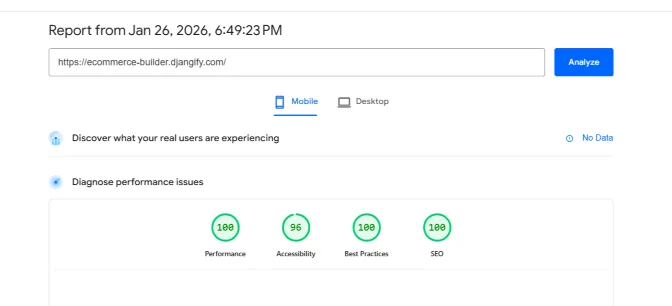

If you have ever wondered why some websites feel lightning-fast while others are so slow they make you want to close the tab, the answer often lies in something called a Lighthouse score. Let me explain what Lighthouse is, why it matters for your online store, and how eCommerce Builder is built from the ground up to help you achieve perfect scores.
What is Google Lighthouse?
Google Lighthouse is a free, open-source tool that audits web pages for performance, accessibility, best practices, and SEO. It simulates how your site loads on a mobile device with a slow connection—because that's how many of your customers will experience it.
Lighthouse generates scores from 0-100 across four categories:
-
Performance – How fast does your site load and become interactive?
-
Accessibility – Can everyone use your site, including people with disabilities?
-
Best Practices – Does your site follow modern web standards and security practices?
-
SEO – Can search engines find and understand your content?
You can run a Lighthouse test yourself at PageSpeed Insights by entering your website URL.
Why Your Lighthouse Score Matters
Search Engine Rankings
Google uses page speed and Core Web Vitals as ranking factors. A slow, poorly optimised site will be penalised in search results, meaning fewer customers will find you.
Customer Experience
Studies consistently show that slow websites lose customers:
-
53% of mobile users abandon sites that take longer than 3 seconds to load
-
Every extra second of load time reduces conversions by 7%
-
Slow sites create a perception of unprofessionalism and unreliability
Accessibility is Good Business
Around 15% of the world's population has some form of disability. An inaccessible website doesn't just exclude potential customers—it may also expose you to legal requirements in many jurisdictions.
Trust and Credibility
Modern browsers warn users about sites with security issues. Following best practices ensures your customers see a professional, trustworthy storefront.
How the eCommerce Builder Achieves Perfect Lighthouse Scores
When we built eCommerce Builder, we didn't treat performance as an afterthought. Every technical decision was made with Lighthouse optimisation in mind. Here's what we have done under the bonnet:
Performance Optimisations
Automatic Image Compression When you upload a hero image or product photo, eCommerce Builder automatically compresses it to WebP format at an optimal quality level. This typically reduces file sizes by 50-70% without visible quality loss.
Optimised CSS Loading Our stylesheet is minified and loaded efficiently, eliminating render-blocking resources that slow down page display.
Deferred JavaScript All JavaScript files use the defer attribute, meaning they load in the background without blocking your page from rendering. Your customers see content faster.
Minimal Layout Shift We've carefully structured our templates to reserve space for images and dynamic content before they load. This prevents that annoying "jumping" effect where content shifts around as the page loads.
Efficient Asset Delivery We use modern loading strategies like fetchpriority="high" for hero images, ensuring the most important content loads first.
Accessibility Built-In
Semantic HTML Every page uses proper heading hierarchy, landmark regions, and ARIA labels so screen readers can navigate your site effectively.
Keyboard Navigation All interactive elements—buttons, links, forms—are fully accessible via keyboard. We've even included a "Skip to main content" link for keyboard users.
Colour Contrast Our default theme meets WCAG AA standards for colour contrast, ensuring text is readable for users with visual impairments.
Focus Indicators When users navigate with a keyboard, they can always see which element is currently focused.
Alt Text Support Every image field in the admin includes alt text options, and we provide guidance on writing effective descriptions.
Best Practices
No Deprecated APIs We continuously update our codebase to remove deprecated browser features before they cause issues.
Secure by Default eCommerce Builder encourages HTTPS, uses secure cookies, and follows modern security headers.
No Console Errors Our templates and JavaScript are tested to ensure no errors appear in the browser console.
SEO Foundation
Structured Data Every product page includes Schema.org markup that helps search engines understand your products, prices, and reviews.
Meta Tags Dynamic meta descriptions, Open Graph tags for social sharing, and canonical URLs are all handled automatically.
Semantic Structure Proper heading hierarchy and semantic HTML help search engines understand your content structure.
What You Can Do to Maintain High Scores
While eCommerce Builder provides an optimised foundation, the content you add affects your scores. Here's how to keep them high:
Image Best Practices
Use Appropriate Sizes Don't upload a 4000px wide image for a thumbnail. Resize images to roughly the size they'll display:
-
Hero images: 1200px wide maximum
-
Product images: 600-900px wide
-
Thumbnails: 200px wide
Choose the Right Format
-
Use JPEG or WebP for photographs - lighthouse prefers it if you use WebP
-
Use PNG only when you need transparency
-
Avoid BMP or TIFF formats entirely
Compress Before Upload While eCommerce Builder compresses hero images automatically, it's good practice to optimise images before uploading. Free tools like Squoosh or TinyPNG can reduce file sizes dramatically.
Always Add Alt Text Describe what's in the image for users who can't see it. Good: "Red leather handbag with gold clasp". Bad: "IMG_2847" or leaving it blank.
Content Best Practices
Use Headings Properly Don't skip heading levels. If you have a H2, the next subheading should be H3, not H4. This helps both accessibility and SEO.
Write Descriptive Link Text Instead of "Click here", write "View our summer collection". Screen readers often navigate by links, so descriptive text helps users understand where they'll go.
Keep Videos External Host videos on YouTube or Vimeo rather than uploading them directly. These platforms handle compression and adaptive streaming far better than self-hosting.
Regular Maintenance
Test Periodically Run your site through PageSpeed Insights every few months, especially after adding significant new content.
Check After Updates When you add new pages or features, test them to ensure they maintain good scores.
Monitor Image Sizes If you notice your media folder growing large, review whether you're uploading unnecessarily large images.
The Bottom Line
A fast, accessible, well-built website isn't just a technical achievement—it's a competitive advantage. Customers stay longer, buy more, and return more often when your site provides a smooth experience.
With eCommerce Builder, you start with a perfect Lighthouse foundation. By following the simple guidelines above, you'll maintain those scores and provide the best possible experience for every customer who visits your store.
Ready to launch your optimised online store? Get started with the Djangify eCommerce Builder today and see the difference a properly built platform makes.